The Dilemma in Modern Presentation Tools
When you look at today’s classroom and presentation landscape, there is a fundamental trade-off every instructor, presenter, and audience member is forced to make: Synchronization versus Autonomy.
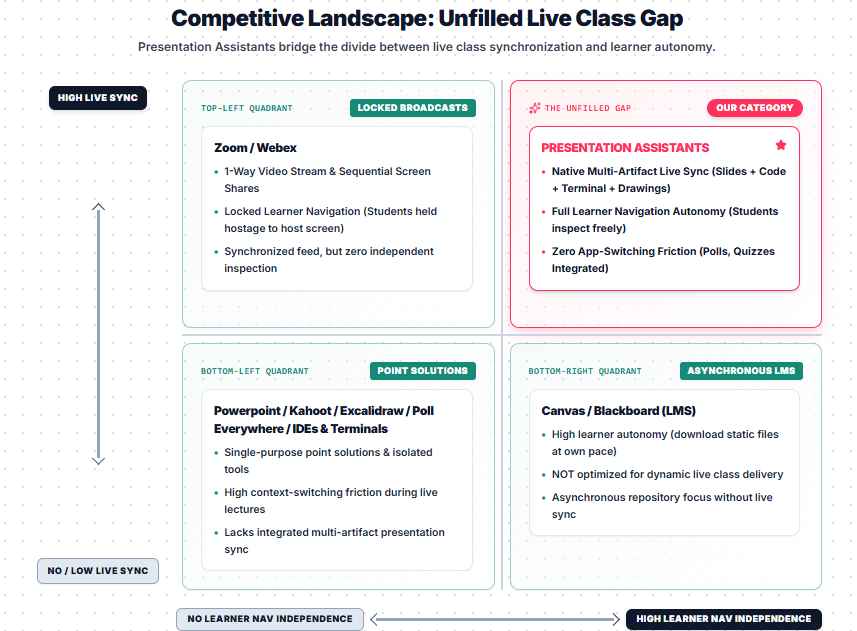
Existing presentation software and educational tools force presenters to choose between keeping everyone in sync or giving learners the freedom to explore content at their own pace. By plotting live synchronization against learner navigation autonomy, we uncover the structural breakdown of existing market solutions—and why a new category is needed.
Breaking Down the 2x2 Matrix
1. Top-Left: Locked Broadcasts (Zoom / Webex)
Video platforms offer tight real-time synchronization, but they completely lock down the audience experience. Learners are held hostage to a single video feed or screen share—if an instructor moves to the next slide or code snippet, students cannot pause, scroll back, or inspect details independently.
2. Bottom-Left: Isolated Point Solutions (PowerPoint / Kahoot / IDEs)
Legacy standards like PowerPoint, combined with specialized tools like Kahoot, Excalidraw, Poll Everywhere, or standalone IDEs, force speakers to juggle disjointed applications. They solve individual problems, but they create heavy context-switching friction and lack unified live synchronization.
3. Bottom-Right: Asynchronous Repositories (Canvas / Blackboard)
Learning Management Systems (LMS) provide high learner autonomy, allowing students to download static files and read at their own pace. However, they are static content repositories completely unsuited for dynamic, synchronous live lectures.
4. Top-Right: The Unfilled Gap (Presentation Assistants)
Presentation Assistants bridge this divide for the very first time. We combine native multi-artifact live synchronization—slides, live code, terminals, and drawings—with integrated engagement tools like polls, quizzes, and anonymous question queues into one unified engine, all while giving every learner full autonomy to navigate, inspect, and keep up at their own pace.
Why This Matters for Presenters and Educators
Using multiple tools for slides, live code execution, polling, and Q&A fragments the presentation experience. By consolidating all these capabilities into a single interactive platform, presenters maintain control without restricting audience freedom.
Whether you are running a technical workshop, a university lecture, or an interactive webinar, Presentation Assistants eliminate app-switching friction and create a continuous, immersive environment for everyone.
👉 Experience the difference yourself and explore all interactive features on Presentation Assistants.