Bridging Live Synchronization and Learner Autonomy
Traditional teaching tech forces an uncomfortable compromise: either instructors lock audiences into a rigid video broadcast feed with zero individual control (like Zoom), or they juggle disjointed applications—switching between slide decks, terminal windows, coding environments, and separate polling software—creating massive cognitive friction.
Presentation Assistants solves this through a robust, browser-based real-time synchronization engine designed specifically for modern technical lectures, interactive classrooms, and live presentations.
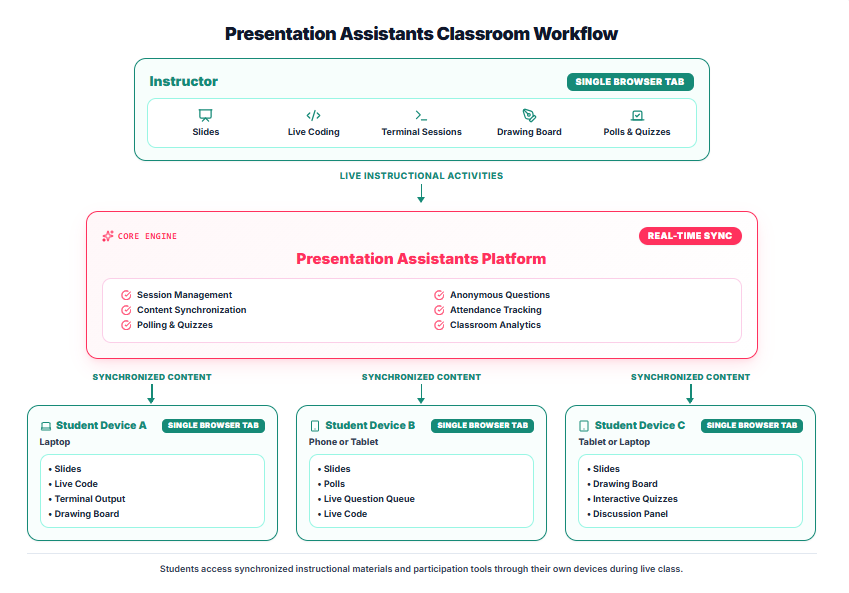
Figure 1. End-to-end classroom data flow from the instructor's single browser tab to multi-device student endpoints.
The "Single Browser Tab" Advantage for Instructors
Instead of managing five different apps on a cluttered desktop, the instructor operates entirely within a Single Browser Tab. From this unified interface, educators seamlessly orchestrate:
- Synchronized Slides: Broadcast markdown or slide presentations that update instantly across all connected client displays.
- Live Coding & Terminal Sessions: Execute real-time code demonstrations and stream terminal output directly to student screens.
- Collaborative Drawing Boards: Sketch diagrams, system architectures, and mathematical proofs on the fly.
- Polls, Quizzes, and Q&A: Trigger instant knowledge checks, host buzzer rounds, and monitor anonymous question queues without ever leaving the presentation view.
Multi-Device Student Autonomy
On the receiving end, students access synchronized course materials and interactive tools directly on their own devices (laptops, tablets, or phones) via a single browser tab. While the instructor maintains active pacing and content synchronization, learners retain the freedom to navigate backward to review previous slides, inspect code snippets, or participate in live discussions at their own pace.
Built for Real-Time Engagement
By combining session management, attendance tracking, instant polling, and discussion panels into a single cohesive engine, educators gain immediate feedback on student comprehension while keeping the classroom focused, accountable, and entirely friction-free.
👉 Ready to transform your lectures? Experience the unified workflow yourself on Presentation Assistants.